How to Build Your Own AI Agent Harness in Rust

There are currently many AI agents that can write code:
- Claude Code
- Codex
- OpenCode
- Pi
And new AI agents keep being released. Why do we have so many? Is it really so simple to build an AI agent harness that many people can create their own? I decided to dive deeper into AI agent harnesses and build one myself to understand their core principles. I will not use Codex to build my own coding agent because then I will not understand how it works. So, let's explore how to build an AI agent harness.
The code for this article is available on GitHub.
AI Agent Harness
First, let's try to understand what an "AI agent harness" is. To me, it means the infrastructure that allows an AI agent to work: tools, memory, security controls, and so on.
So, it is nothing special - just a collection of software components that control an AI agent.
Use Cases
- Write code.
- Chat about existing code.
- Execute research tools while writing code.
- Select previous chats and continue the conversation.
- Remain independent of any LLM vendor by supporting ChatGPT, Claude, and other models.
When I started building my implementation, I initially considered creating a GUI application. However, after trying it, I realized that I was spending too much time building the GUI itself and did not have enough time to focus on the AI components.
That is why I decided to build a CLI agent harness without a GUI or TUI, allowing me to focus on the core functionality.
High-Level Design
CLI
Loading...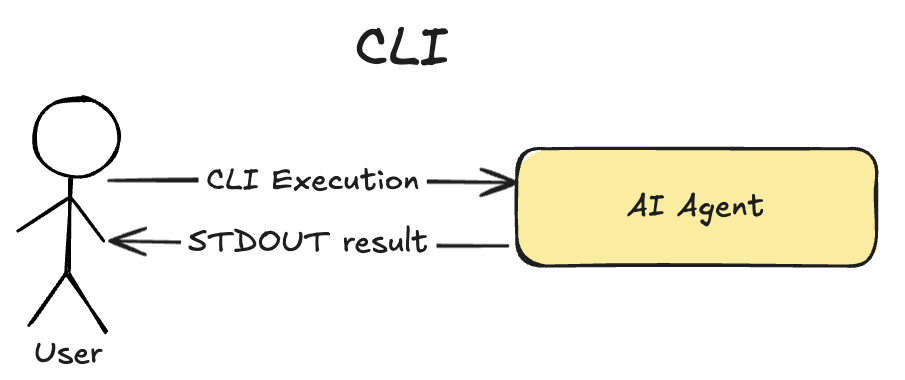
The prototype consists only of a CLI tool that executes the AI agent and provides its results through logs written to STDOUT and a Markdown output file. In the first version of elicode, the most important part is the AI agent, not the UI.
However, I eventually plan to implement a UI for elicode after covering all the AI-agent-related functionality.
AI Agent
To build the coding agent, I use a ReAct architecture with an orchestration prompt and a list of tools that the LLM can execute:
Loading...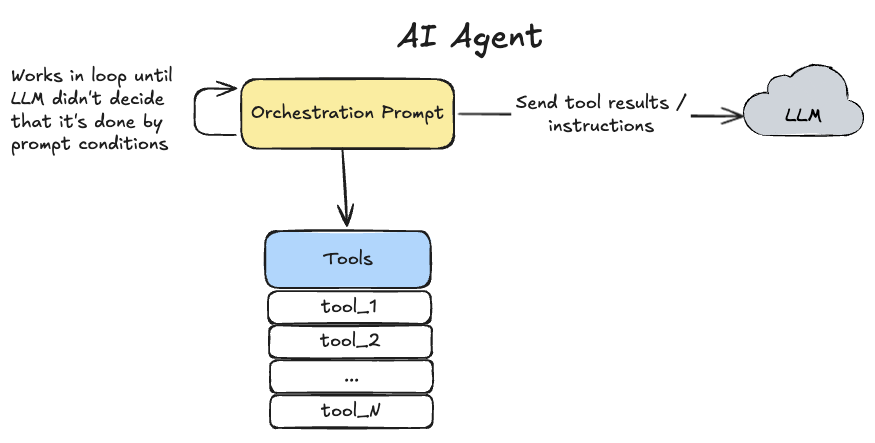
It is a standard architecture for AI agents, but it is still very powerful because it allows the LLM to execute tools and change its behavior based on their results.
AI Agent Tools
Within the scope of the elicode prototype, I have only one tool:
- The
bash-commandtool executes any Bash command on the machine whereelicodeis running.
The bash-command tool provides a great deal of flexibility by allowing me to reuse other CLI programs on my system. It is unsafe, but it is acceptable for prototyping and learning purposes. I plan to implement additional tools in future versions.
The
bash-commandtool allows an LLM to write, build, and test code very quickly. However, it also creates a major security vulnerability by allowing the LLM to execute any command it is instructed to run. Therefore, a production AI agent harness should not allow unrestricted use of thebash-commandtool. Instead, it should provide focused tools such asread-fileandwrite-filewith proper access controls.
Detailed Design
Coding with an AI Agent
Here is an example of using elicode to create a Telegram bot for Hacker News:
1elicode "Build a Hacker News bot in Bun and TypeScript that scrapes Hacker News and sends articles through a Telegram bot on request. Use the telegram_bot folder." --output result.md
To handle these CLI parameters, elicode follows this process:
Loading...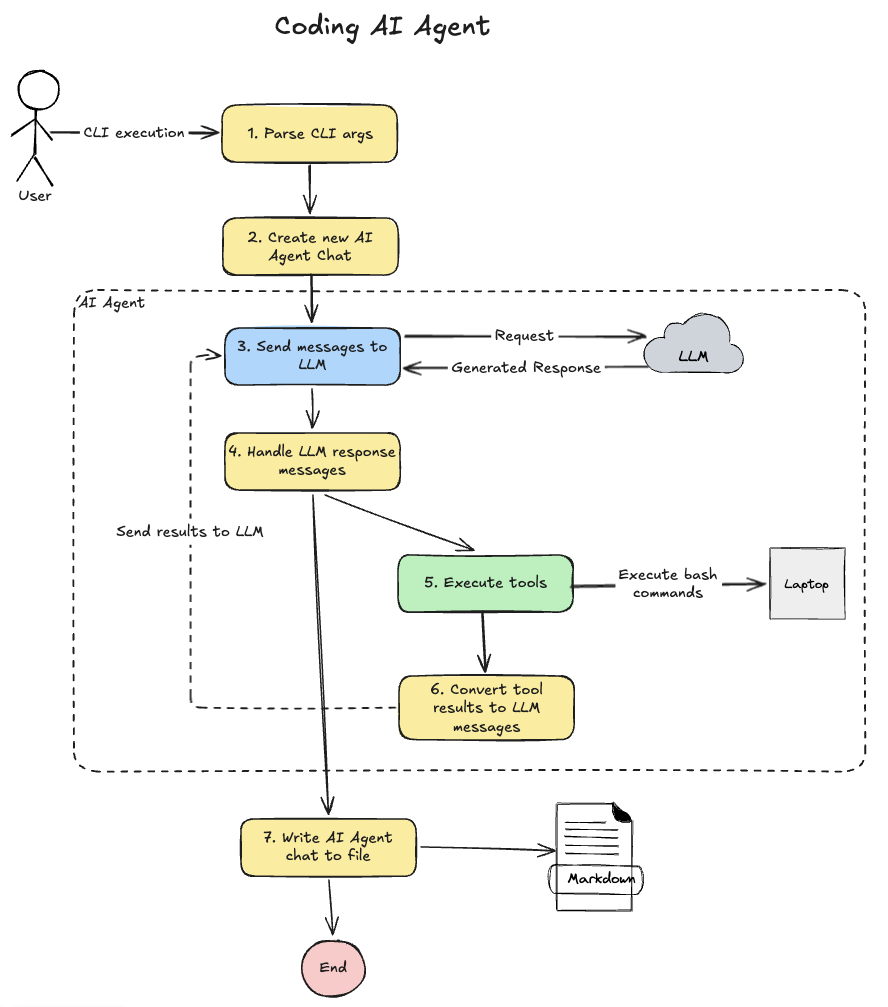
- Parse the CLI arguments to understand what needs to be done.
- Create a new AI agent chat if one does not already exist.
- Send the
systemprompt and theusermessage from the CLI argument to the LLM as the first two messages in the chat. - Handle the LLM response and determine whether a tool needs to be executed or the process should end.
- Execute the tools requested by the LLM. Currently, only one tool is supported: the Bash command tool.
- Convert the tool results into LLM messages and return to step 3. This process continues in a loop until the LLM decides to stop.
- When the loop ends, write the execution results to a Markdown file to make it easier to analyze what happened.
This process is simple, but it produces powerful results. Using only the prompt above, elicode produced a working Telegram bot implementation:
Loading...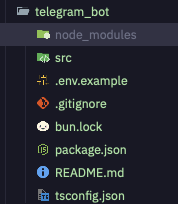
CLI Contract
Start or continue a chat with a message:
1elicode <my-new-message> --chat-id <id> --output result.md
--chat-idallows the user to reuse a previous chat and add a new message to it.--outputwrites the conversation with the LLM in Markdown format. Because a UI is not supported yet, this output is useful for understanding what happened.
The prototype currently supports only one LLM provider: OpenAI.
The configuration file is located at ~/.config/elicode/config.json.
Project Architecture
The code is available on GitHub.
Loading...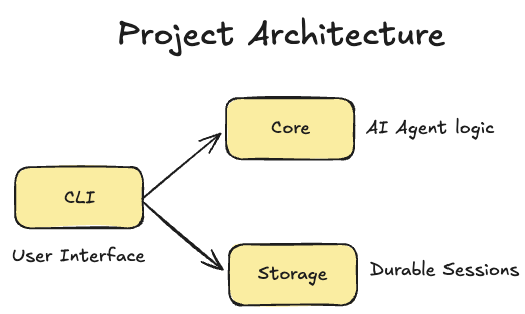
There are three crates:
corecontains the core AI agent code. It is an independent layer containing only AI-agent-related logic.storagecontains the logic for storing chats. I moved it out of thecorecrate to makecoremore independent and flexible.cliis the client of thecorecrate that allows users to execute the AI agent from the command line.
This architecture allows me to add a GUI later without coupling the core logic to it, following the Dependency Rule.
Loading...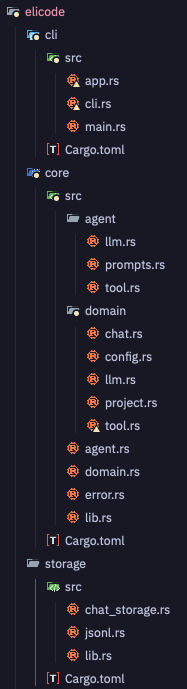
By separating responsibilities across crates, I will eventually be able to replace the CLI with a GUI without changing the application's core logic:
Loading...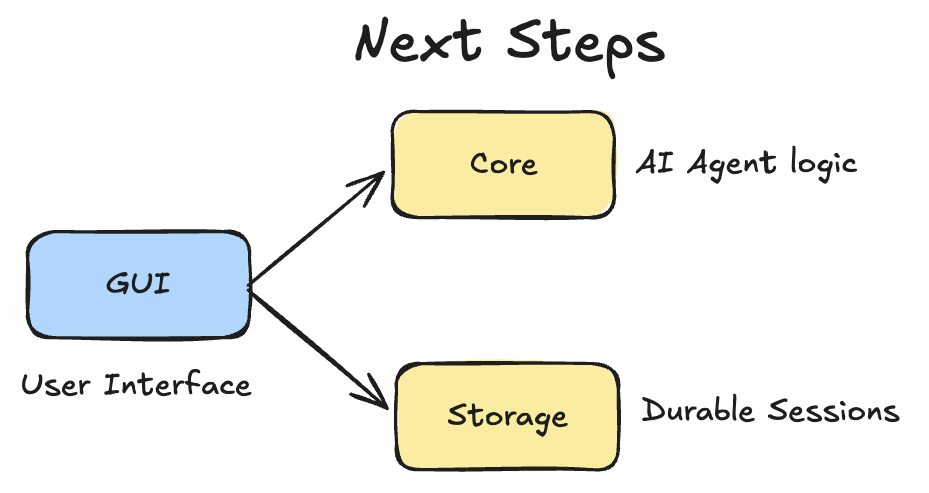
Storage Layer
To allow users to continue previous chats, I need a storage layer. I considered several options. The main requirement was that the storage layer should run locally on a developer's machine with zero setup.
Multiple elicode processes should also be able to work with the storage layer concurrently without affecting one another's performance. Concurrency should be supported between different chats, not within the same chat.
Option 1: SQLite
With the SQLite option, the storage layer would use a SQL database to store messages, chats, and other data.
Pros:
- Provides access to data through SQL.
- Makes integrations easy to implement.
Cons:
- Database locking: if multiple processes try to write messages, a database-level lock will block one of them, forcing it to wait. This creates a clear performance bottleneck. Even if two processes are working with two different chats, SQLite will still lock the database and cause contention between them.
Option 2: JSON File
With this option, the storage layer would store everything in JSON files and rewrite the entire file after each update.
Pros:
- Processes can independently write chat messages for multiple chat sessions without sharing a database-level lock.
Cons:
- Adding each message requires rewriting the entire JSON file.
Option 3: JSONL File
With this option, the storage layer writes each chat to a JSONL file in append-only mode, where each line is an independent JSON object.
Pros:
- Processes can independently write chat messages for multiple chat sessions without sharing a database-level lock.
- Existing files do not need to be overwritten after each update.
Cons:
- Read and write operations are more complex because the final data structure must be reconstructed from individual objects.
Winner: JSONL File
I decided to use JSONL because it provides better performance for this access pattern than the SQLite or JSON file options. The final JSONL file for a chat looks like this:
1{ChatRecord}
2{MessageRecord}
3{MessageRecord}
4{MessageRecord}
- The first row contains the chat object and its metadata.
- The remaining rows contain independent messages.
The read and write operations are available on GitHub.
Demo
To use EliCode, execute the CLI with a prompt. For example:
1elicode "Build a Three.js 3D snowboarding simulator with WASD controls in the current folder. The player should ride endlessly downhill and earn points. If the player hits a tree, they die and must click Try Again to start a new race."
As a result, it built a simple game:
Loading...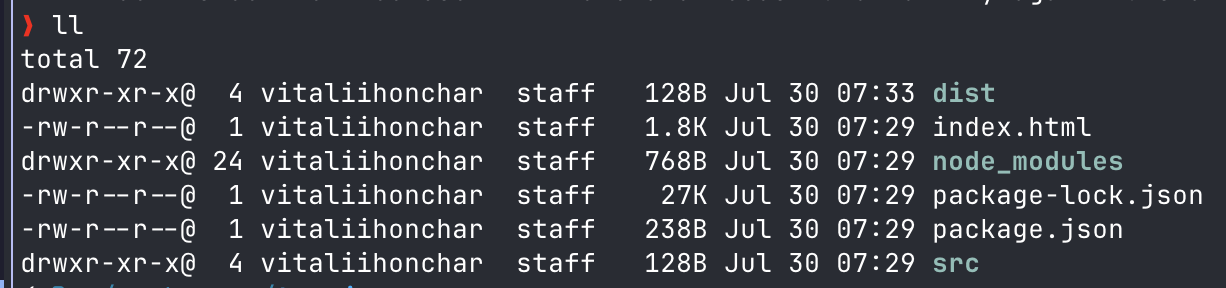
The game has a simple interface because I used the inexpensive gpt-5.6-luna LLM for development purposes, but EliCode works:
Loading...
Summary
While building EliCode, I explored how to create a coding agent. To my surprise, building the prototype was no harder than building a regular AI agent. I only needed to give the agent the ability to execute Bash commands.
However, this is true only for a prototype. Building a production-grade AI agent requires much more effort, particularly in the area of security. The bash tool is unsuitable for production because it allows an AI agent to control your computer, and a prompt-injection attack could cause significant harm.
The bash tool is acceptable within the scope of this prototype. Next, I plan to investigate AI agent security by trying to break EliCode with prompt-injection attacks and then fixing the vulnerabilities I discover.
The code for EliCode is available on GitHub.
📧 Stay Updated
Get weekly insights on backend development, architecture patterns, and startup building directly in your inbox.
Free • No spam • Unsubscribe anytime
Share this article
Related articles
AI Software Factory with Codex: Plan, Code, Test - Indie Hacking Blog #4
An architecture walkthrough and prototype demo of an AI software factory with Codex: a persistent workflow engine for planning, coding, and testing, with YAML workflows, PostgreSQL state, retries, and human code review.
How To Keep Building Side Projects in AI era?
How do you stay motivated to build projects when AI tools are taking over more of the coding? Building projects is an essential part of the indie hacking journey. But as a software engineer, it can be difficult to keep going when AI is changing the work that made you excited about building software in the first place.
