Shipping an iOS App as a Backend Engineer Who Doesn't Know Swift

One month ago I challenged myself: build an iOS application without Swift and iOS knowledge using only Claude Code. I did it. Growly is live in the App Store, approved on the first submission with zero rejections. I worked on it around 8 hours per week before my day job on a Claude Code Max subscription, and I wrote the System Design and Quality Control documents in about 2 hours total. In this article I will explain the main concepts of iOS apps vibe coding with Claude Code.
Context
I'm a Senior Software Engineer with 9 years of experience and a primary focus on backend systems with knowledge of Go, Java/Kotlin, JS/TS, Python, AWS, Kubernetes, etc. Also I know how to build web UI with React, a little bit of Vue and jQuery. But I never built iOS apps, that's why I decided to choose this domain after reading the When AI writes almost all code, what happens to software engineering? article and listening to the The creator of Clawd: "I ship code I don't read" podcast.
My target was: to learn how I can utilize my software engineering skills in a completely new domain with Claude Code.
Complexity of iOS apps development with Swift
The main complexity of iOS apps development comes not from Swift itself, which is a pretty similar language to Kotlin or Rust, but from the iOS platform and Xcode.
Main problems:
- It's hard to run iOS application testing in an emulator by Claude Code.
- SwiftUI spaghetti-code views produced by Claude Code by default.
- It's hard to build UI end-to-end tests in iOS compared to the web.
- Application crashes when something goes wrong - in web you get errors in the console, not app crashes.
- Inconsistent UI design between screens.
- Poor UI design by default produced by Claude Code which looks more like a Tailwind website than a native iOS app.
- Wrong data access patterns built by Claude Code which caused app crashes.
So this complexity is introduced by the iOS platform and SwiftUI because it seems that Anthropic models weren't trained on iOS code base at the same level as JS/TS or Python.
To mitigate the complexity mentioned above you need to:
- Install Claude Code plugins to teach Claude Code to develop iOS apps.
- Write a System Design document to explain to Claude Code how to build an app, what dependencies should be between layers and what UI design to use.
- Configure linters and write tests to ensure acceptable quality of an application, otherwise the chance of breaking the app after each change is very high.
Claude Code Plugins
Before all, you need to install the right Claude Code plugins to simplify development:
- superpowers - improves development flows overall by introducing brainstorming, code review and plan-execute stages.
- axiom - a big set of skills for iOS development, highly recommend to install because it covers lack of iOS domain knowledge.
- context7 - allows Claude Code to access actual documentation.
- swift-lsp - Swift LSP to improve Claude Code coding skills in Swift.
These plugins allow Claude Code to write good Swift code with modern liquid glass iOS design. But to begin development you need to prepare an architecture of an application to allow Claude Code to use installed plugins efficiently and to have truly AI engineering and not "vibe coding".
System Design
Loading...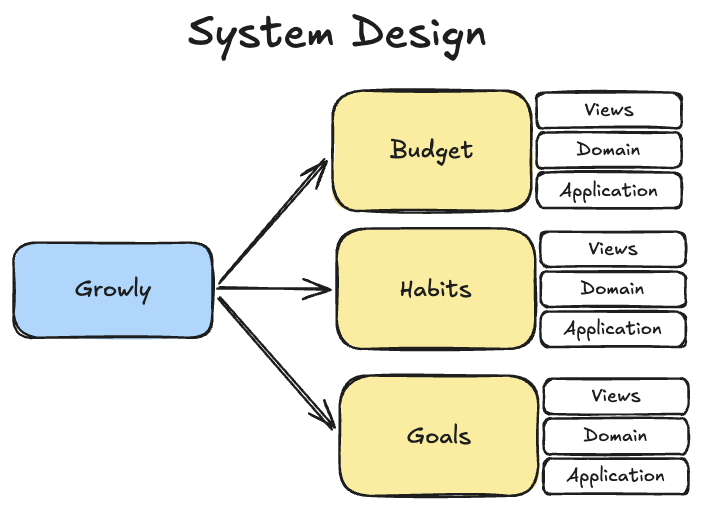
The System Design document is the most important preparation part before starting to write code with Claude Code. In the enterprise software development cycle it's always required to build a system design before jumping to the development. It seems that in the AI era this step is unnecessary because you can just go and develop stuff, but it's not true. Without a proper system design document the AI Agent will develop something, but not exactly what you want. That's why I found that even a small architecture document improves the quality of software produced by Claude Code.
The minimal system design document for Claude Code may contain these sections:
- Problem Statement - an explanation of what problem we have.
- Proposed Solution - an explanation of how we plan to solve the problem.
- Functional Requirements - set of requirements for the proposed solution.
- Architecture - an architecture of the application where Claude Code should work. It may contain DDD folders like "domain", "application", "infrastructure", etc. I explicitly explained dependencies between layers to maximize flexibility and allow editing features independently. See DDD, Hexagonal, Onion, Clean, CQRS, … How I put it all together.
- UI - requirements for UI design. It contains explanation of what colors to use, typography and liquid glass requirements.
This system design document should be in a Markdown file and created for the AI Agent, not for a human. The AI Agent should be able to read it and understand what we are trying to build. Btw, writing this document can be done with Claude Code itself.
Quality Control
After writing the System Design document and before starting development you need to configure quality control for Claude Code. In other Vibe Coding articles it's named the Feedback Loop.
Feedback Loop - data which describes what Claude Code did and how the application behaves after finishing development, example: failed or passed unit test. If a test failed then Claude Code gets the stacktrace and info about the failed test. This is the feedback loop for Claude Code because it can work until the test passes.
The quality control contains a couple of important sections:
- Linter - use the most strict linter the programming language supports. With it Claude Code will produce much better code.
- Unit tests - ask Claude Code to cover your code with many unit tests to have a fast feedback loop during development and ensure quality.
- E2E tests - these tests will test full flows in the application and they should be reduced in number because the time to run is long, that's why the feedback loop for Claude Code is long as well.
In terms of the iOS application the most critical for me were E2E tests which are UI tests with real UI component clicks. Configuring Linter and Unit tests is trivial and Claude Code did it in one shot, but you need to explicitly say to make the Linter super strict to catch every possible code smell. But E2E tests were not so trivial.
I found that by default Claude Code tried to make all UI tests parallel which caused my MBP CPU/RAM to cry due to 6 parallel emulators of iOS. That's why I restricted to max 2 parallel E2E tests. Also E2E tests took around 20 minutes to run on Growly, that's why I configured Claude Code to run them only on the main branch and only after big changes. Because another concept of the Feedback Loop is that the loop should be short, while 20 minutes of E2E tests is completely not a short loop.
It makes sense to create a Quality Control document or put it inside the System Design document to allow Claude Code to refer to this information.
Development
After installation of the specified plugins, writing the system design document and configuring quality control, Claude Code is ready to start development using the superpowers plugin:
- Start Claude Code with the
--dangerously-skip-permissionsflag - no need to review and approve all actions because we are going fully into AI Engineering. The flag name is a warning - I only use it in an isolated branch with nothing else checked out. - Change Claude Code mode to "planning".
- Ask Claude Code to review the system design document and prepare implementation using superpowers brainstorming skills. Usually skills should trigger automatically but sometimes they don't work, so to ensure that a skill will be used I explicitly say what skill to use.
- Answer all Claude Code questions.
- Review the provided plan and if needed change it by sending your concerns to Claude Code.
- Approve the plan and start building by enabling bypass permissions.
During the development phase Claude Code will build a lot of things but in most cases it will be AI-slop, that's why the quality control configured earlier is what keeps this loop honest.
An experience of Vibe Coded application
I built the Growly application with the principles specified above and I can say that even with the detailed System Design Document, Quality Control configuration, and plugins, Claude Code still can't build stuff in one shot without errors.
- It constantly produced inconsistent UI.
- App crashes which can't be caught by E2E tests and were caught by manual testing only.
- Some minor logical bugs.
Of course a human developer will do the same, but I don't compare them - I want to understand Vibe Coding and use Claude Code for my benefits. And this is possible, even efficient and required.
All these minuses can be mitigated by doing AI-assisted software engineering and not Vibe Coding:
- Inconsistent UI can be fixed by manual testing what Claude Code developed and guiding it to build the UI I want.
- App crashes can be fixed by manual testing and then automating these specific app crash test cases in E2E tests.
- Logical bugs can be caught by manual testing as well.
So testing is super important with AI-assisted software engineering because a feature or fix can be produced very quickly, but I as a software engineer have a vision of what application I want to build and I can control what Claude Code is building.
Also I don't like parallel feature development with Claude Code. Yes, gitworktree is super useful in case you need to trigger development of a parallel feature and it involves some time to wait for build or communications. But during the Growly development I realized that I can't test features in parallel and I need to focus on one feature and complete it first. That's why I mostly didn't use parallel feature development for Growly.
Conclusions
Vibe Coding is the hype term, and for me as a software engineer it's more AI-assisted software engineering, because with pure Vibe Coding I can't produce high quality software. I can produce some software - maybe it will work - but this software is not production ready and it's what is called AI slop. That's why to build really production ready software you need to apply software engineering principles:
- Write a System Design document.
- Think about Design.
- Write a Quality Control document and configure it.
- Use the right plugins for Claude Code.
- Test your software and fix it.
I still think that software engineer is the best profession in the world. AI scared me about it for a while, but I see the benefits of AI usage and it gives really good opportunities to build software which was impossible to build before. For example: an iOS app for me as a backend engineer would require a couple of months of learning the iOS platform and only then building something, but with Claude Code I directly applied my backend skills and built a production ready application.
As a conclusion I can say - learn Claude Code. It's a powerful software engineering tool. Not vibe coding, but an engineering tool.
And try to use the Vibe Coded application which helps to track budget, habits and goals - Growly. All data stays on your device so it's fully secure to use.
📧 Stay Updated
Get weekly insights on backend development, architecture patterns, and startup building directly in your inbox.
Free • No spam • Unsubscribe anytime
Share this article
Related articles
How To Keep Building Side Projects in AI era?
How do you stay motivated to build projects when AI tools are taking over more of the coding? Building projects is an essential part of the indie hacking journey. But as a software engineer, it can be difficult to keep going when AI is changing the work that made you excited about building software in the first place.
A Better Way to Brainstorm Startup Ideas | Indie Hacking Vlog #3
In this video, I’m improving my indie hacking brainstorming process by using the How Might We technique to move from problems and product vision toward concrete product ideas. Instead of immediately brainstorming features or startup ideas, I start by defining the product vision: what problem I want to solve, who I want to help, and what outcome the product should create. I also explain the criteria I use to evaluate and vote on different directions.
